

How do you deposit on 1win, step by step?
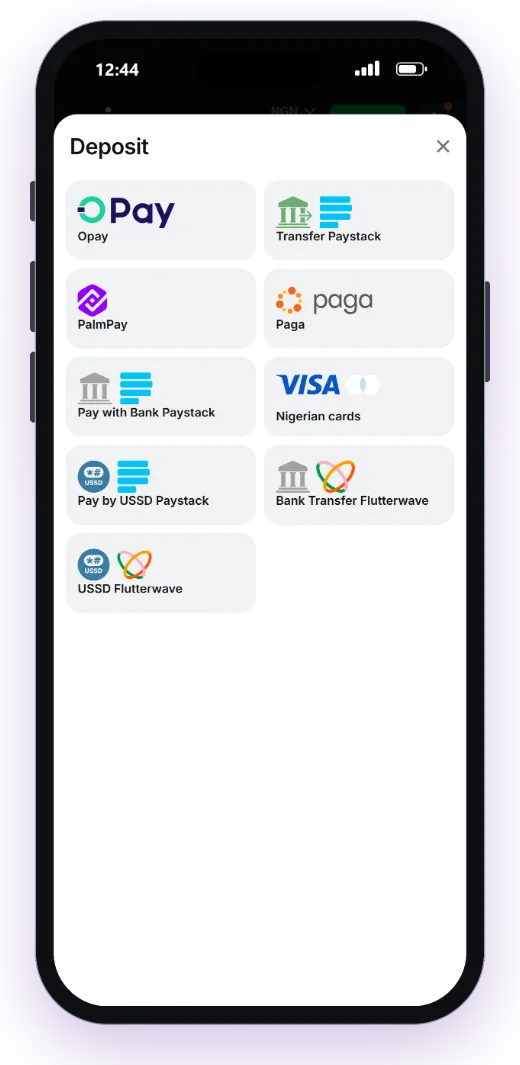
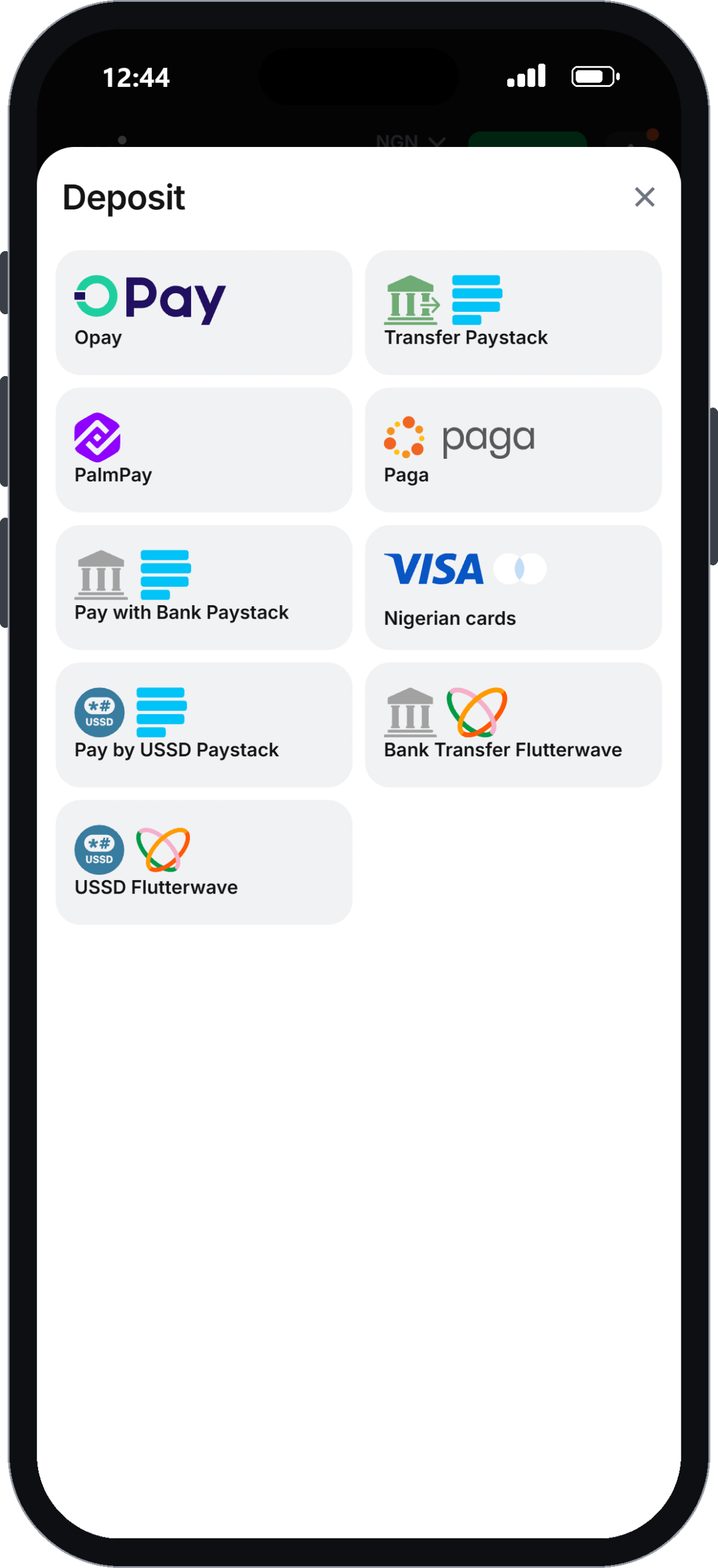
Nine separate payment buttons sit in the naira cashier on 1win.ng, and the cashier states a ₦1,000 minimum deposit; only the card button shows its own range. This guide to a 1win deposit walks through what that cashier showed when we opened it on an Android phone in October 2026: Opay, PalmPay, Paga, three Paystack routes, two Flutterwave routes and Nigerian Visa, Mastercard and Verve cards. Cards run from ₦1,000 up to ₦1,000,000. There is no crypto, and the cashier states no fees. We did not move real money, so treat the timings below as the operator’s own claims, not our results. You will find the exact taps, the 2026 minimums, what usually makes a payment fail, and one thing to sort out before you fund the account at all. Open a 1win account and reach the cashier
Depositing on 1win takes five taps from the account balance to a confirmed payment, and the cashier states a ₦1,000 minimum deposit. The Deposit window opens from the balance button at the top of both the desktop site and the mobile browser version.
The flow, as the cashier presents it:
- Log in and tap the balance or the Deposit button.
- Pick a method: Opay, Transfer Paystack, PalmPay, Paga, Pay with Bank Paystack, Nigerian cards, Pay by USSD Paystack, Bank Transfer Flutterwave or USSD Flutterwave.
- Type an amount of at least ₦1,000.
- Confirm, then finish in the wallet, bank screen or USSD prompt that follows.
- Check the balance. The cashier does not show crediting times, so keep the payment confirmation until your balance updates.
Deposits and the welcome bonus
One detail matters if you want the welcome package. The first-deposit offer is 100% plus 70 free spins, and it pays out a maximum bonus of ₦750,000. The bonus attaches to the deposit, so decide before you pay. The wagering maths is on the 1win bonus breakdown page.
If you have not registered yet, sign-up is only a +234 phone number and a password of 8 or more characters. Enter the promo code NAIJA1WIN in the optional promo field to get the welcome package on your first deposit of ₦1,000 or more.
No withdrawal form until your identity is verified
A 1win deposit goes through with no documents at all, but the money cannot come back out the same way. When we tapped Withdraw, the cashier opened an “Identity verification” screen. It showed no withdrawal methods and no limits until ID was submitted.
In practice, you can fund the account, play and win before 1win has seen a single document. Live chat told us checks need a passport, driver’s licence or residence permit. Terms clause 4.4.3 adds proof of address: a utility bill or bank statement less than 3 months old. Support quoted 24–72 hours for review.
Say you deposit ₦10,000 on a Friday night and finish Saturday ₦25,000 up. Nothing moves until verification clears, which could run into Monday or Tuesday. Nothing in the terms suggests the money is at risk. The problem is the wait, and you only find out about it when you try to cash out.
Our advice is plain. Upload ID and a recent bank statement before your first deposit, not after. The methods, and what reviewers report about payout speed, are covered on the 1win withdrawal guide.
Minimum and maximum amounts by method
The 1win cashier states a general ₦1,000 minimum deposit. Only cards show their own range, ₦1,000 to ₦1,000,000 per payment; the other buttons show no amounts of their own in the list we saw.
| Method | Minimum | Maximum shown | Fee shown |
|---|---|---|---|
| Opay | Not shown (cashier minimum ₦1,000) | Not stated | Not stated |
| PalmPay | Not shown (cashier minimum ₦1,000) | Not stated | Not stated |
| Paga | Not shown (cashier minimum ₦1,000) | Not stated | Not stated |
| Paystack (Transfer, Pay with Bank, USSD) | Not shown (cashier minimum ₦1,000) | Not stated | Not stated |
| Flutterwave (Bank Transfer, USSD) | Not shown (cashier minimum ₦1,000) | Not stated | Not stated |
| Nigerian cards (Visa, Mastercard, Verve) | ₦1,000 | ₦1,000,000 | Not stated |
“Fee not stated” is not the same as “free”. Your bank or USSD provider can still charge its own fee on top, and 1win’s page says nothing about that either way. If you pay by USSD, check your bank’s charge before you dial.
For a side-by-side look at each method, including which ones also pay out, see our 1win payment methods comparison.
Is the minimum deposit any different in the 1win app?
The 1win app minimum deposit is the same ₦1,000 as on desktop. If you are wondering how to deposit in 1win app on your phone, the steps match the browser version: tap the balance button, open Deposit, pick a method and enter the amount. The “app” is the mobile site running in your phone browser, and it uses the same cashier with the same nine methods.
On Android, the bottom bar shows Menu, Home, Casino, Free money and Sports. The Deposit button sits beside the balance at the top of the screen. If you want to know how to deposit in the 1win app, the steps above apply unchanged. On a phone, Opay and PalmPay are usually the smoothest, because the payment approval happens in a wallet app you already use.
One honest point about phones: there are no deposit limits to set, either on mobile or desktop. Setting up the shortcut is covered on the 1win app page.
Why does a 1win deposit fail, and what fixes it?
Most 1win deposit problems come from four causes: an amount under ₦1,000, a card blocked for gambling payments, a USSD session that timed out, or a wallet approval that was never completed. The cashier gives no troubleshooting guide, and the site has no FAQ or help centre, so you have to work through these yourself.
What to check, in order:
- Amount: at least ₦1,000, the minimum the cashier states.
- Card: some Nigerian banks decline gambling payments on Verve or Mastercard. Switching to Opay, PalmPay or Paystack transfer gets around this.
- USSD: these codes expire quickly. If the screen closed before you entered your PIN, start the deposit again from the cashier instead of re-dialling an old code.
- Debited but no balance: keep the transaction reference and do not pay a second time.
When the money goes missing
If money left your account but did not arrive, contact support: live chat runs 24/7, alongside Telegram and WhatsApp. Details are on the 1win contact page. Send your bank reference with the first message so it can be traced.
Who this cashier is NOT for: anyone who wants crypto, or anyone who wants a monthly deposit cap to control spending. 1win offers neither.
Pick Opay or Paystack, verify first, and the 1win deposit is painless
We rate the 1win deposit experience at about 7 out of 10, matching the site’s payments score. Nine local methods and a low ₦1,000 stated minimum are generous. The problems are what the cashier leaves out.
Pros
- A low stated minimum deposit of ₦1,000
- Opay, PalmPay and Paga built in, alongside two USSD routes
- A clear card ceiling of ₦1,000,000
Cons
- No fees disclosed, and no troubleshooting guide
- No crypto and no deposit limits to set
- Withdrawals stay locked until identity documents clear
Start with a wallet, upload your ID the same day, and only then decide whether to take the welcome offer. Go to the 1win cashier and make your first deposit.
Claim the welcome bonus18+ · T&C apply
FAQ
How to deposit on 1win with Opay?
Open the Deposit window, choose Opay, enter at least ₦1,000 and approve the payment in your Opay app. The cashier does not show how fast wallet payments are credited, so keep the Opay confirmation until your balance updates. If the money leaves Opay but the balance stays the same, keep the transaction reference and contact live chat rather than paying twice.
What is the 1win app minimum deposit?
The minimum is ₦1,000, the same as on desktop, because the mobile site uses the same cashier. Only cards show their own range; the other methods show no separate minimum, so treat ₦1,000 as the general figure the cashier states. Card payments can go as high as ₦1,000,000 in a single deposit.
What should I do about a 1win deposit problem where I was debited?
Do not repeat the payment. Save the bank or wallet reference and send it to live chat, Telegram or WhatsApp so the payment can be traced.
Can I deposit on 1win with crypto?
No, the naira cashier has no cryptocurrency option. It lists only Opay, PalmPay, Paga, Paystack and Flutterwave transfer or USSD, and Nigerian Visa, Mastercard and Verve cards. The cashier states a general ₦1,000 minimum deposit.
Does 1win charge a fee on deposits?
The cashier does not state any fee for any method. That is not a promise that deposits are free: your bank, card issuer or USSD provider may still charge its own fee, so check with them before paying, especially for small USSD deposits.