

Which options does the naira cashier actually list?
Nine separate payment buttons sit in the naira cashier at 1win.ng, and Paystack and Flutterwave each appear more than once under different labels. That makes the 1win payment methods look wider than they really are. When we opened the cashier on an Android phone in October 2026, the real choice came down to three groups. First, the wallets: Opay, PalmPay and Paga. Second, the bank rails run through Paystack and Flutterwave, covering transfer, Pay with Bank and USSD. Third, Nigerian Visa, Mastercard and Verve cards. The cashier states a ₦1,000 minimum deposit, only cards show their own range, and there is no crypto and no agent option at all. The useful question is which route gets money back to you fastest once withdrawals unlock, and where the gaps sit. If that mix suits how you bank, you can open a 1win account with your +234 number.
The 1win naira cashier lists nine deposit buttons: Opay, Transfer Paystack, PalmPay, Paga, Pay with Bank Paystack, Nigerian cards (Visa, Mastercard, Verve), USSD Paystack, Bank Transfer Flutterwave and USSD Flutterwave. All of them accept NGN only, and the cashier states a ₦1,000 minimum deposit. Only the card button shows its own range; the other buttons show no amounts of their own.
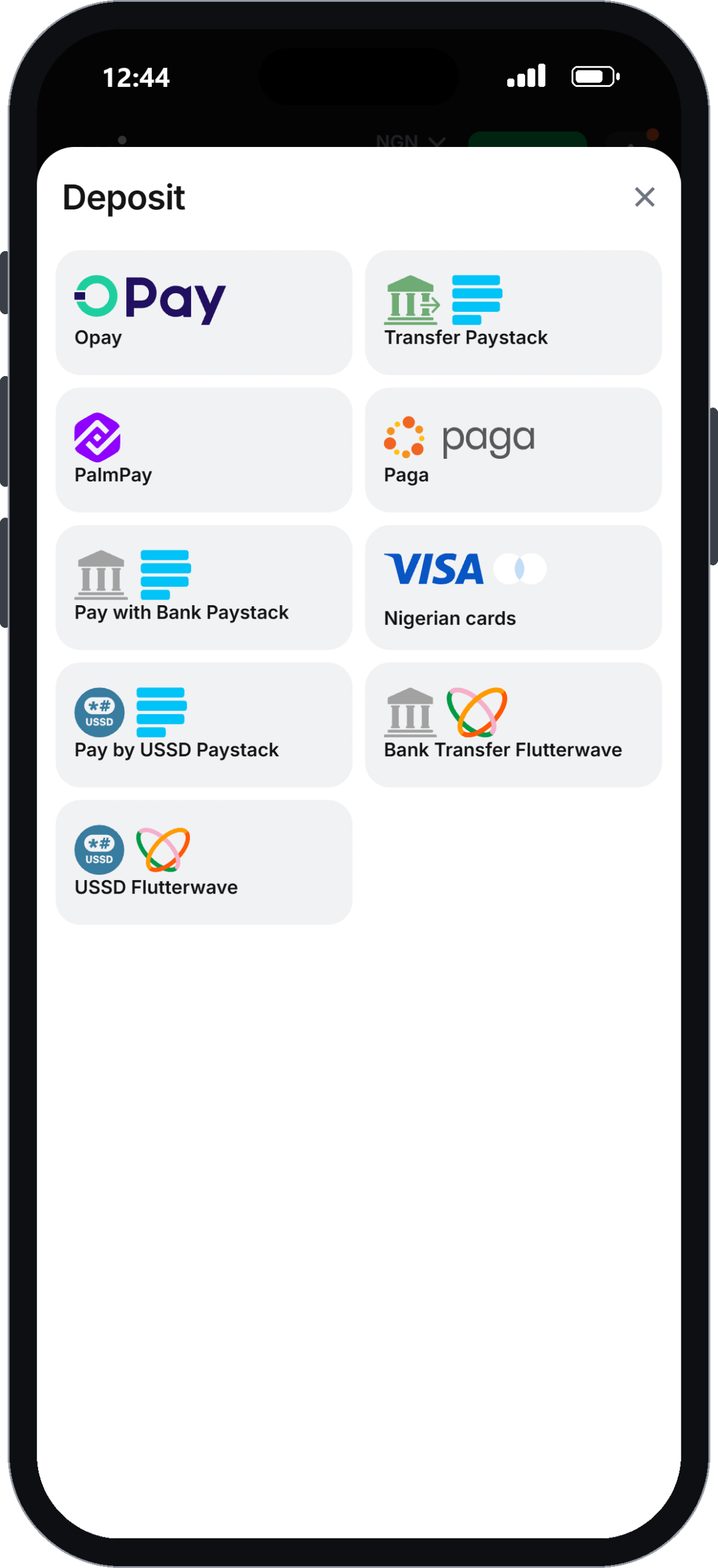
Strip out the duplicate processors and you get three families. There are three e-wallets, one card gateway, and two payment companies, Paystack and Flutterwave, that between them handle bank transfer, direct bank debit and USSD codes. For a Nigerian player, the USSD route matters most. It works from a basic phone with no data, which no card or wallet route can match.
| Method | Deposit | Withdrawal listed | Payout speed |
|---|---|---|---|
| Opay | No own limit shown | Yes | Instant (per reviews) |
| PalmPay | No own limit shown | Yes | Not stated |
| Paga | No own limit shown | Yes | Not stated |
| Paystack (Transfer, Pay with Bank, USSD) | No own limit shown | Yes | Up to 1 hour to bank (per reviews) |
| Flutterwave (Bank Transfer, USSD) | No own limit shown | Yes | Up to 1 hour to bank (per reviews) |
| Nigerian cards | ₦1,000–₦1,000,000 | Visa only | Not stated |
The speed column is not 1win’s promise. The operator states no payout times anywhere. The two figures shown come from independent reviews, and we did not move real money during our check.
Cards are the only route with a published ceiling, and no method states a fee
Nigerian cards are the only method in the 1win cashier with a published range, at ₦1,000 to ₦1,000,000 per deposit. Opay, PalmPay, Paga, Paystack and Flutterwave show no amounts of their own; only the cashier’s general ₦1,000 minimum deposit is stated. None of the nine buttons says whether a fee applies.
This is the real weakness of the cashier. You cannot plan a large deposit through Opay or a USSD code without first trying it and seeing what the processor accepts. Your bank or wallet may also apply its own transfer charges, and the site never tells you whether 1win adds anything on top.
Withdrawal limits hidden until KYC
The withdrawal side is worse. The limits and timings stay hidden behind the identity check. Clicking Withdraw before KYC brings up an “Identity verification” screen instead of a form, so you cannot even see the methods side by side until your documents clear.
In practice, a player paying through PalmPay knows only the general ₦1,000 minimum and nothing specific to that wallet. You will not know the cash-out minimum, the daily cap or the processing time until after verification. Reviews also note that large withdrawals can trigger extra checks. So anyone planning six-figure sessions should expect paperwork beyond the standard ID.
For how each deposit screen behaves, the step-by-step deposit guide for naira players covers the clicks.
Can you fund the account through a payment agent?
No payment agent option exists in the 1win cashier. The nine listed methods are all direct digital routes: wallets, Paystack, Flutterwave and Nigerian cards. There is no agent, retail shop or cash voucher button, and the site does not name any authorised 1win payment agent.
That matters because many Nigerian bettors grew up topping up through a shop agent. Searches for a “1win payment agent” usually come from players who expect the same set-up here. It is not there. Anyone on Telegram or WhatsApp offering to “fund your 1win wallet” for cash is a third party. The operator does not list them, and the terms give you no protection if the money never arrives.
The closest thing to an agent is Opay or PalmPay itself. Both wallets have street-level agents who will load cash into your own wallet account. You then deposit from that wallet in your own name. The money stays traceable to you, which also keeps the later withdrawal and identity check clean.
If you have no smartphone data, USSD through Paystack or Flutterwave does the job a shop agent would. You dial a code from your bank and approve the transfer on a feature phone.
Wallet or bank rail: which pays out faster?
Opay is the fastest-reported withdrawal route on 1win, with independent reviews describing Opay cash-outs as instant. Bank payouts through Paystack or Flutterwave are reported at up to 1 hour. The operator itself publishes no withdrawal times for any method, so treat both figures as third-party reports rather than guarantees.
PalmPay, Paga and Visa card payouts have no reported speed at all, either from 1win or from the reviews we cross-checked. That does not mean they are slow. It means nobody has put a figure on them.
If speed is your priority, depositing with Opay and withdrawing to the same wallet is the cleanest pairing on paper. For the full payout process and pending-status fixes, see the complete withdrawal walkthrough.
Is there room for crypto or a foreign card?
The 1win naira cashier has no cryptocurrency option. Our check found no Bitcoin, USDT or any other coin among the nine methods, and the card gateway is labelled “Nigerian cards” covering Visa, Mastercard and Verve only.
For most local players this changes little. Naira wallets and bank rails cover nearly every way people in Lagos, Abuja or Kano move money day to day. The people it does affect are players who keep part of their bankroll in stablecoins, and diaspora users holding a UK or US card. Neither group has a route in the NGN cashier.
The account runs entirely in naira. So there is no currency conversion step inside 1win. Any exchange cost is created by the bank or wallet you fund from, before the money reaches the cashier.
The welcome package attaches to these naira deposits from ₦1,000. Its x30 rollover and x1 cash-out cap are set out under the welcome bonus terms and wagering rules.
Pairing your deposit route with your withdrawal route
The 1win withdrawal list is shorter than the deposit list. It names Opay, Paystack, PalmPay, Paga, Visa (Nigerian cards) and Flutterwave. Mastercard, Verve and the separate USSD buttons do not appear by name. That gap decides which deposit method makes sense if you plan to cash out.
A Verve or Mastercard deposit will not obviously return to the same card. You may have to withdraw to a bank account through Paystack or Flutterwave instead. That works, but the account name must match the identity you verify. The terms’ address rule (clause 4.4.3) asks for a utility bill or bank statement no older than 3 months. Support chat told us ID can be a passport, driver’s licence or residence permit, with checks taking 24–72 hours.
The cleanest pattern is to use one method for both directions. Opay in and Opay out. Paystack bank transfer in and Paystack out. That keeps the trail simple when verification looks at your payment history.
What works:
- Three local wallets plus USSD for feature-phone users
- A low stated minimum deposit of ₦1,000
- No conversion step, since everything runs in naira
- A pending withdrawal can be cancelled from the Details page
What does not:
- No published fees, payout times or withdrawal limits
- Mastercard and Verve are missing from the withdrawal list
- No crypto and no agent option
Opay and early verification give the smoothest route through the cashier
Of the 1win payment methods, Opay is the strongest choice for most Nigerian players. It is listed for both deposits and withdrawals, and it carries the only instant payout report. Bank rails through Paystack or Flutterwave come second. Their reported payout window is longer, but they suit anyone who prefers money landing straight in a bank account.
The cashier earns a middling assessment, in line with the 7.0 payments score in our review. Local coverage is good, and USSD is a genuine plus. The opacity is the problem. Fees are not stated, limits are shown only for cards, and payout times are missing entirely. Too much stays unclear until after you upload documents.
This cashier is not for players who want to fund through a shop agent or with crypto. It is also a poor fit if you need to know your withdrawal ceiling before depositing a large sum.
Verify your identity before your first deposit, keep one method for both directions, and expect the payout picture to sharpen only after KYC clears. When that suits you, sign up and add Opay as your first funding method.
Claim the welcome bonus18+ · T&C apply
FAQ
Does 1win have a payment agent in Nigeria?
No, 1win lists no payment agent or retail top-up option in its Nigerian cashier. Funding works only through Opay, PalmPay, Paga, Paystack, Flutterwave and Nigerian cards. If you rely on cash, load it into your own Opay or PalmPay wallet at a wallet agent, then deposit from that wallet in your own name.
Which 1win payment methods pay out fastest?
Opay is the fastest-reported withdrawal method, with independent reviews describing payouts as instant. Bank withdrawals via Paystack or Flutterwave are reported at up to an hour. 1win itself publishes no payout times, and withdrawal limits appear only after identity verification is complete.
Can I use a Verve card on 1win?
Yes, Verve cards are accepted for deposits alongside Nigerian Visa and Mastercard. However, the withdrawal list names only Visa among cards. Verve users should expect to cash out to a bank account through Paystack or Flutterwave instead, in the same name as the verified account holder.
What is the maximum card deposit on 1win?
Nigerian card deposits on 1win range from ₦1,000 up to ₦1,000,000 per transaction. Cards are the only method in the cashier that shows an upper limit. Opay, PalmPay, Paga, Paystack and Flutterwave show no amounts of their own: only the cashier’s general ₦1,000 minimum deposit is stated, with no published maximum.
Is USSD available for 1win deposits?
Yes, USSD deposits are available through two separate buttons, USSD Paystack and USSD Flutterwave. You dial your bank's code from any phone and approve the transfer without mobile data. For withdrawals, these routes appear simply as Paystack and Flutterwave, paying back to a bank account.
Does 1win accept PalmPay and Paga?
Yes, both PalmPay and Paga are listed for deposits and withdrawals in the 1win naira cashier. Neither shows its own minimum; the cashier states a general ₦1,000 minimum deposit. Unlike Opay, neither wallet has a payout speed reported by the operator or by independent reviews, so expect timings to become visible only after verification.